ShopDreamUp AI ArtDreamUp
Deviation Actions




Description
THIS VERSION WAS UPDATED ON 8/07/09
if you downloaded these before this date, and they were not working before, please download again and they should be fine.
detailed stock rules in my journal - but at least do this:
 note me/leave a comment here with a link to the picture you have made with this stock.
give credit - give people a link to this picture in your description thing 
Brush pack contains:
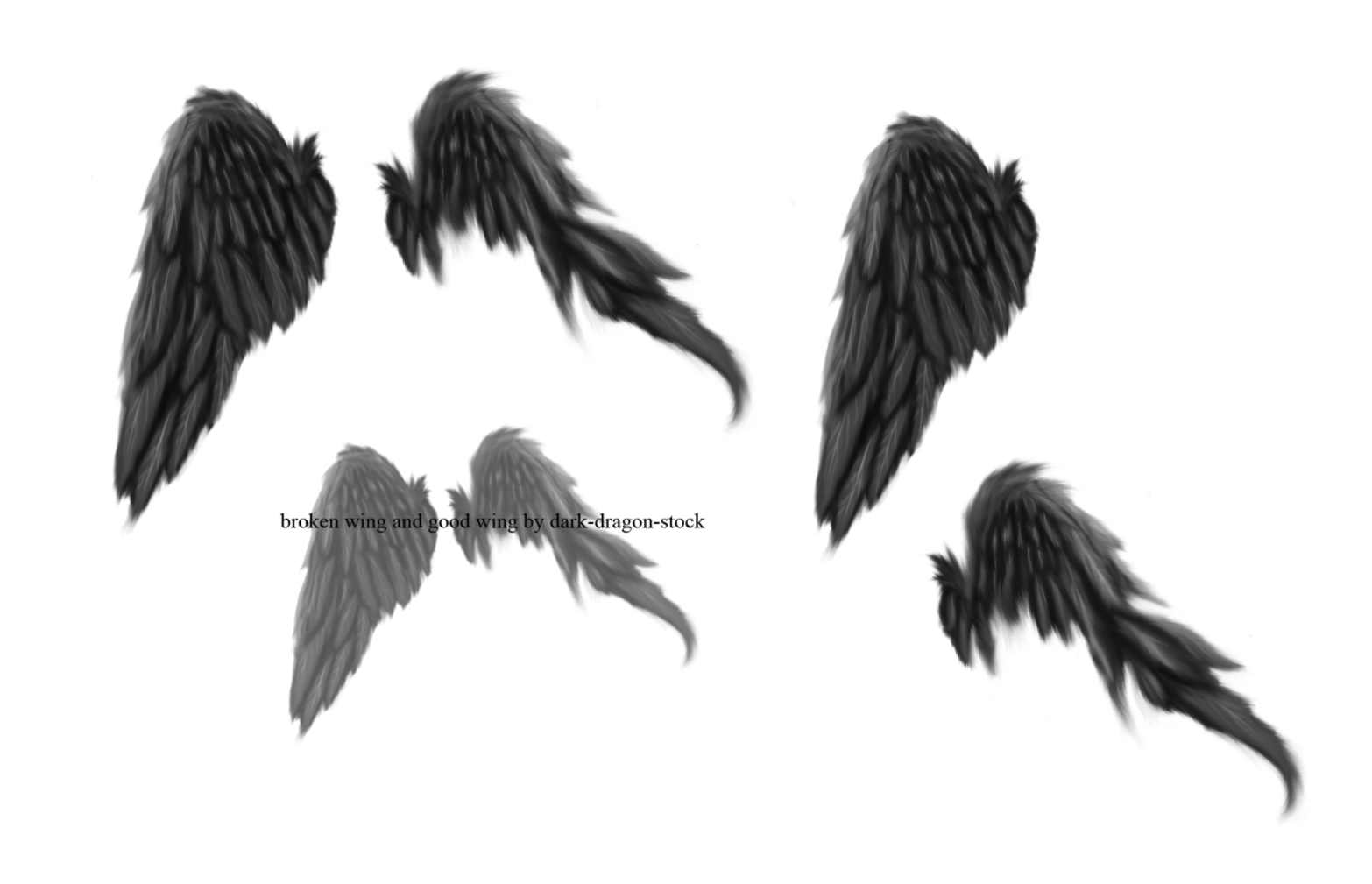
3 wing brushes. 1 broken wing, one normal wing, and one brush including both wings (all of these will be shown in the preview) + the preview picture as a brush so you can remember where you got them J
click download to get these brushes!
When you download the pack, just open up photoshop, and go to the drop-down bar where you see all your brushes. There should be a small arrow in the top right hand corner. Click that, and chose load brushes - then look through your files and double click on the file with the same name as the title of this deviation, and then they will be at the bottom of your list of brushes on the dropdown bar! If you have any problems, please feel free to ask me and I will do my best ^_^
if you cant use them in your version of photoshop, then you can make them into brushes yourself.
save the picture, and open it in photoshop. select one pattern on its own, and go to edit->define brush preset->ok. then go to the list of brushes, scroll to the bottom, and it will be there, ready to use!
Alternatively, I have also uploaded a PNG file for you: (if these is no link here, I am still working on updating the brushes and it will be here by the end of today! In the event that I have forgotten, where the date is not 8th july, then feel free to note me and I will happily upload the picture for you, or show you where Is is J
small tutorial of exactly how to use photoshop brushes:
1) first of all press the download button, where is
is 
2) save the brushes when the options box comes up - and remeber where you saved them!
3) open up your phtoshop, and click the brush tool so that you can draw and whatever.
4) then, (at the top of the page in photoshop, near file and edit) where it says brush: then there is a black circle, an a number under it, and a tiny arrow on the left - you need to click the tiny arrow. the list of brushes will appear; and, at the top right hand corner, there is another tiny arrow pointing to the right.
5) click the tiny arrow, and lots of options will come up.
6) the options are separated into different sections. go down five sections, and you need to click "load brushes"
7)then a thing where all your files are comes up, and you need to find the brushes you saved - they will be in a single file altogether, so all you need to do is look for either the title of the brushes (for these, it will be good wing and broken wing by dark-dragon-stock) or the picture similar to the photoshop program thumbnail, with the title underneath it.
8)click the file to open it, and, tada! the brushes from the file will be at the end of your list of brushes on photoshop.
9)to use a brush, its easy - just click the brush you want to use like normal, and then just click on the page - or at least a new file/picture your doing, and the brush shape will appear as a drawing kind of thing
its best if you use the mouse, to keep it neat and it wont move so much as using a tablet or something unless its a brush that does different stuff.....then you can just mess around and see what you can do ^_^

if you downloaded these before this date, and they were not working before, please download again and they should be fine.
detailed stock rules in my journal - but at least do this:
note me/leave a comment here with a link to the picture you have made with this stock. give credit - give people a link to this picture in your description thing Brush pack contains:
3 wing brushes. 1 broken wing, one normal wing, and one brush including both wings (all of these will be shown in the preview) + the preview picture as a brush so you can remember where you got them J
click download to get these brushes!
When you download the pack, just open up photoshop, and go to the drop-down bar where you see all your brushes. There should be a small arrow in the top right hand corner. Click that, and chose load brushes - then look through your files and double click on the file with the same name as the title of this deviation, and then they will be at the bottom of your list of brushes on the dropdown bar! If you have any problems, please feel free to ask me and I will do my best ^_^
if you cant use them in your version of photoshop, then you can make them into brushes yourself.
save the picture, and open it in photoshop. select one pattern on its own, and go to edit->define brush preset->ok. then go to the list of brushes, scroll to the bottom, and it will be there, ready to use!
Alternatively, I have also uploaded a PNG file for you: (if these is no link here, I am still working on updating the brushes and it will be here by the end of today! In the event that I have forgotten, where the date is not 8th july, then feel free to note me and I will happily upload the picture for you, or show you where Is is J
small tutorial of exactly how to use photoshop brushes:
1) first of all press the download button, where
is 2) save the brushes when the options box comes up - and remeber where you saved them!
3) open up your phtoshop, and click the brush tool so that you can draw and whatever.
4) then, (at the top of the page in photoshop, near file and edit) where it says brush: then there is a black circle, an a number under it, and a tiny arrow on the left - you need to click the tiny arrow. the list of brushes will appear; and, at the top right hand corner, there is another tiny arrow pointing to the right.
5) click the tiny arrow, and lots of options will come up.
6) the options are separated into different sections. go down five sections, and you need to click "load brushes"
7)then a thing where all your files are comes up, and you need to find the brushes you saved - they will be in a single file altogether, so all you need to do is look for either the title of the brushes (for these, it will be good wing and broken wing by dark-dragon-stock) or the picture similar to the photoshop program thumbnail, with the title underneath it.
8)click the file to open it, and, tada! the brushes from the file will be at the end of your list of brushes on photoshop.
9)to use a brush, its easy - just click the brush you want to use like normal, and then just click on the page - or at least a new file/picture your doing, and the brush shape will appear as a drawing kind of thing
its best if you use the mouse, to keep it neat and it wont move so much as using a tablet or something
unless its a brush that does different stuff.....then you can just mess around and see what you can do ^_^ © 2007 - 2024 dark-dragon-stock
Comments225
Join the community to add your comment. Already a deviant? Log In
I'm thankful!
A used case, the name which is you as a special thanks and a right. Of I'll mention. As there is miracle like a wing in the world.